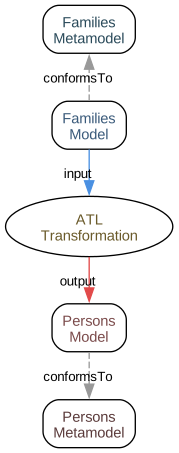
Collections in ATL are manipulated using OCL (Object Constraint Language) operations. These operations provide functional-style collection processing.
Common operations include collect (map), select (filter), and reject (inverse filter).
ATL Transformations
Learn how to manipulate collections in ATL transformations using OCL collection operations.
In this tutorial, you’ll discover how to iterate, filter, and transform collections of model elements.
You’ll master essential collection operations like collect, select, reject, exists, and forAll.
Section 1
Collections in ATL are manipulated using OCL (Object Constraint Language) operations. These operations provide functional-style collection processing.
Common operations include collect (map), select (filter), and reject (inverse filter).
Step 1
Create a metamodel with collection relationships.
This metamodel defines Department and Course classes with one-to-many relationships.
1<?xml version="1.0" encoding="UTF-8"?>2<ecore:EPackage xmi:version="2.0" xmlns:xmi="http://www.omg.org/XMI" xmlns:xsi="http://www.w3.org/2001/XMLSchema-instance"3 xmlns:ecore="http://www.eclipse.org/emf/2002/Ecore" name="University" nsURI="http://www.example.org/university" nsPrefix="uni">4 <eClassifiers xsi:type="ecore:EClass" name="Department">5 <eStructuralFeatures xsi:type="ecore:EAttribute" name="name" eType="ecore:EDataType http://www.eclipse.org/emf/2002/Ecore#//EString"/>6 <eStructuralFeatures xsi:type="ecore:EReference" name="courses" upperBound="-1" eType="#//Course" containment="true"/>7 </eClassifiers>8 <eClassifiers xsi:type="ecore:EClass" name="Course">9 <eStructuralFeatures xsi:type="ecore:EAttribute" name="code" eType="ecore:EDataType http://www.eclipse.org/emf/2002/Ecore#//EString"/>10 <eStructuralFeatures xsi:type="ecore:EAttribute" name="title" eType="ecore:EDataType http://www.eclipse.org/emf/2002/Ecore#//EString"/>11 <eStructuralFeatures xsi:type="ecore:EAttribute" name="credits" eType="ecore:EDataType http://www.eclipse.org/emf/2002/Ecore#//EInt"/>12 <eStructuralFeatures xsi:type="ecore:EAttribute" name="level" eType="ecore:EDataType http://www.eclipse.org/emf/2002/Ecore#//EInt"/>13 </eClassifiers>14</ecore:EPackage>Step 2
Use collect to extract values from collections.
The collect operation maps each element to a new value, creating a new collection.
1-- @path University=/University/University.ecore2-- @path Catalog=/Catalog/Catalog.ecore34module UniversityTransform;5create OUT: Catalog from IN: University;67-- Helper using collect: get all course titles from a department8helper context University!Department def: courseTitles: Sequence(String) =9 self.courses->collect(c | c.title);Step 3
Use select to filter collections.
The select operation creates a new collection containing only elements that satisfy a condition.
1-- @path University=/University/University.ecore2-- @path Catalog=/Catalog/Catalog.ecore34module UniversityTransform;5create OUT: Catalog from IN: University;67-- Helper using collect: get all course titles from a department8helper context University!Department def: courseTitles: Sequence(String) =9 self.courses->collect(c | c.title);1011-- Helper using select: get only advanced courses (300+ level)12helper context University!Department def: advancedCourses: Sequence(University!Course) =13 self.courses->select(c | c.level >= 300);Step 4
Use reject for inverse filtering.
The reject operation is the opposite of select, excluding elements that match the condition.
1-- @path University=/University/University.ecore2-- @path Catalog=/Catalog/Catalog.ecore34module UniversityTransform;5create OUT: Catalog from IN: University;67-- Helper using collect: get all course titles from a department8helper context University!Department def: courseTitles: Sequence(String) =9 self.courses->collect(c | c.title);1011-- Helper using select: get only advanced courses (300+ level)12helper context University!Department def: advancedCourses: Sequence(University!Course) =13 self.courses->select(c | c.level >= 300);1415-- Helper using reject: get all courses except introductory (100 level)16helper context University!Department def: nonIntroductoryCourses: Sequence(University!Course) =17 self.courses->reject(c | c.level < 200);Section 2
Beyond basic filtering and mapping, OCL provides operations for testing collection properties, computing aggregates, and creating nested collections.
Operations like exists, forAll, size, and isEmpty enable sophisticated collection queries.
Step 1
Use exists to test if any element matches.
The exists operation returns true if at least one element satisfies the condition.
1-- @path University=/University/University.ecore2-- @path Catalog=/Catalog/Catalog.ecore34module UniversityTransform;5create OUT: Catalog from IN: University;67-- Helper using exists: check if department has any graduate courses8helper context University!Department def: hasGraduateCourses(): Boolean =9 self.courses->exists(c | c.level >= 500);Step 2
Use forAll to test if all elements match.
The forAll operation returns true only if every element satisfies the condition.
1-- @path University=/University/University.ecore2-- @path Catalog=/Catalog/Catalog.ecore34module UniversityTransform;5create OUT: Catalog from IN: University;67-- Helper using exists: check if department has any graduate courses8helper context University!Department def: hasGraduateCourses(): Boolean =9 self.courses->exists(c | c.level >= 500);1011-- Helper using forAll: check if all courses have at least 3 credits12helper context University!Department def: allCoursesSubstantial(): Boolean =13 self.courses->forAll(c | c.credits >= 3);Step 3
Combine collection operations.
Chain multiple operations together for complex collection processing.
1-- @path University=/University/University.ecore2-- @path Catalog=/Catalog/Catalog.ecore34module UniversityTransform;5create OUT: Catalog from IN: University;67-- Helper combining select and collect: get titles of advanced courses8helper context University!Department def: advancedCourseTitles: Sequence(String) =9 self.courses10 ->select(c | c.level >= 300)11 ->collect(c | c.title);1213-- Helper with complex filtering: get high-credit advanced courses14helper context University!Department def: intensiveAdvancedCourses: Sequence(University!Course) =15 self.courses16 ->select(c | c.level >= 300)17 ->select(c | c.credits >= 4);Step 4
Build a complete transformation with collection operations.
The complete transformation demonstrates practical collection manipulation in model transformations.
1-- @path University=/University/University.ecore2-- @path Catalog=/Catalog/Catalog.ecore34module UniversityTransform;5create OUT: Catalog from IN: University;67-- Helper: get titles of advanced courses8helper context University!Department def: advancedCourseTitles: Sequence(String) =9 self.courses10 ->select(c | c.level >= 300)11 ->collect(c | c.title);1213-- Helper: check if department offers graduate program14helper context University!Department def: hasGraduateProgram(): Boolean =15 self.courses->exists(c | c.level >= 500);1617-- Helper: calculate total credits in department18helper context University!Department def: totalCredits: Integer =19 self.courses20 ->collect(c | c.credits)21 ->sum();2223-- Rule: Transform departments with graduate programs24rule GraduateDepartment {25 from26 s: University!Department (s.hasGraduateProgram())27 to28 t: Catalog!Program (29 name <- s.name,30 type <- 'Graduate',31 totalCredits <- s.totalCredits32 )33}3435-- Rule: Transform undergraduate-only departments36rule UndergraduateDepartment {37 from38 s: University!Department (not s.hasGraduateProgram())39 to40 t: Catalog!Program (41 name <- s.name,42 type <- 'Undergraduate',43 totalCredits <- s.totalCredits44 )45}Question 1 of 3
What is the difference between select and reject?
Question 2 of 3
What does collect do to a collection?
Question 3 of 3
Can you chain collection operations together?
Explore advanced ATL rule patterns including lazy rules, called rules, and imperative sections.