MTL Code Generation

Hello World Template

Learn the basics of MTL (Model-to-Text Language) by creating your first code generation template using the OMG MOFM2T standard.

In this tutorial, you’ll create a simple “Hello, World!” template, understand MOFM2T syntax, and generate your first output using swift-mtl.

15 mins Estimated Time

Section 1

Understanding MTL Templates

MTL (Model-to-Text Language) is the OMG MOFM2T (MOF Model-to-Text Transformation) standard for generating code and text from models. Templates combine static text with dynamic expressions to produce output.

Every MTL template starts with a module declaration and contains at least one template definition. Think of templates as functions that generate text instead of returning values.
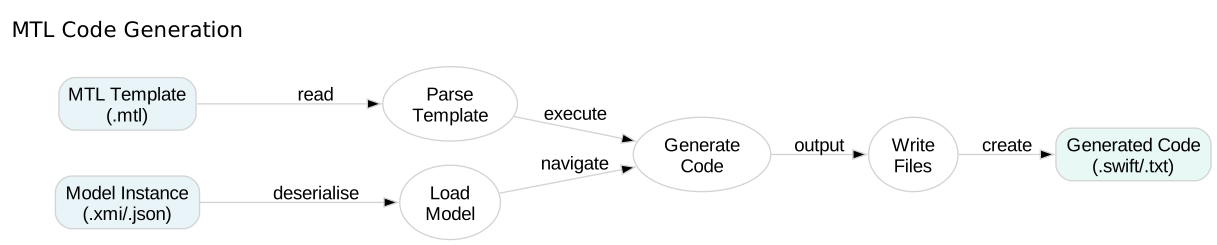
MTL Template Structure

Step 1

Create an MTL module with a namespace.

The module declaration defines the template’s namespace and metamodel URI. The URI can be any valid identifier—for simple templates without models, use a placeholder like 'http://example.com'.

HelloWorld.mtl
1[module HelloWorld('http://example.com')]

Step 2

Add a template definition.

The [template main()] directive defines a template named main. This is the entry point—the template that will be executed when you run swift-mtl.

HelloWorld.mtl
1[module HelloWorld('http://example.com')]
2
3[template main()]
4[/template]

Step 3

Add static text content.

Any text outside of MTL directives (which use [brackets]) is generated literally to the output. This is your first complete MTL template!

HelloWorld.mtl
1[module HelloWorld('http://example.com')]
2
3[template main()]
4Hello, World!
5
6This is the simplest MTL template.
7It generates a "Hello, World!" message to demonstrate basic text generation.
8[/template]

Section 2

Generating Output

MTL templates generate output through the swift-mtl command-line tool. The generator executes your template and writes the result to files.

You can generate to standard output for quick testing or to a directory for persistent file creation.

Step 1

Generate output to the console.

The generate command executes the template. Without --output, it prints to standard output—perfect for testing small templates.

Terminal
1swift-mtl generate HelloWorld.mtl

Step 2

Generate output to a file.

Using --output creates files in the specified directory. MTL automatically creates a file named after your module (HelloWorld.txt by default).

Terminal
1swift-mtl generate HelloWorld.mtl --output generated/

Step 3

View the generated output.

The generated file contains exactly what you wrote in the template—MTL copied the static text to the output file.

HelloWorld.txt
1Hello, World!
2
3This is the simplest MTL template.
4It generates a "Hello, World!" message to demonstrate basic text generation.

Section 3

Template Structure Best Practices

Well-structured templates are easy to read and maintain. Follow MTL conventions for module names, template organisation, and documentation.

Use descriptive names, add comments for complex logic, and keep templates focused on a single purpose.

Step 1

Add comments to document your template.

MTL comments use [comment] blocks. Comments are ignored during generation—use them to explain what your template does and how to use it.

HelloWorld.mtl
1[comment]
2MTL Hello World Template
3This template demonstrates the basics of MTL code generation.
4
5Usage:
6 swift-mtl generate HelloWorld.mtl --output generated/
7[/comment]
8
9[module HelloWorld('http://example.com')]
10
11[template main()]
12Hello, World!
13
14This is the simplest MTL template.
15It generates a "Hello, World!" message to demonstrate basic text generation.
16[/template]

Step 2

Verify your template structure.

The validate command checks template syntax without generating output. Use it to catch errors early before running generation.

Terminal
1swift-mtl validate HelloWorld.mtl

Check Your Understanding

Question 1 of 3

What is the purpose of the module directive in MTL?

Question 2 of 3

What happens to text outside MTL directives?

Question 3 of 3

What does the main template represent?

Expressions and Variables

Learn how to use dynamic expressions and variables in MTL templates to generate computed values.